

Creature body
The two basic symbols are:
- X – stick,
- () – branch.
The body structure is built like a tree: new sticks are attached to the ends of the previous ones.
- X(X,X) means two sticks from a one-stick root,
- X(X,X,X) means three sticks from a one-stick root,
- X(X,X,) is also possible, as well as
- X(,X,,,X,,X,,)
Inside parentheses, the full angle is divided into as many parts as there are commas+2. Each stick in such a 'junction', when controlled by a bending muscle, has the freedom of the full angle divided by the number of branches.
Modifiers (special characters) can be placed before X's and ('s. They affect the following X and, with a progressively lesser effect, subsequent X's. Modifiers modify stick position and features. Uppercase and lowercase letters can be used; uppercase letters increase the given property while lowercase ones decrease it.
Modifiers: Rr, Qq, Cc, Ll, Ww, Ff, Aa, Ss, Mm, Ii, Ee.
Modifiers affecting color (only visuals, no other function) of Parts: Dd (red), Gg (green), Bb (blue).
| Sticks' (joints') properties |
| R | rotation (by 45 degrees) – this modifier DOES NOT affect further sticks |
| Q | twist |
| C | curvedness |
| Physical properties |
| L | length |
| F | friction (sticks will slide on the ground or stick to it; does not influence interaction with water) |
| W | weight (in water only: light sticks move towards the surface, heavy ones fall down) |
| Biological properties |
| A | assimilation = photosynthesis (a vertical stick can assimilate twice as much as a horizontal one) |
| S | stamina (increases chance of survival during fights, see also simulator parameters – destructive collisions) |
| M | muscle strength, a.k.a. muscle speed (strong muscles act with greater force, gain higher speed, can resist greater stress, and use more energy if muscle energy calculation is enabled) |
| I | ingestion (ability to gain energy from "food" – energy balls) |
| Other |
| E | energy (experimental). Creature's starting energy can be higher or lower when 'E' or 'e' is used. You should use it only when the "energetic efficiency mode" is enabled (see simulator parameters). Otherwise, do not enable 'eE' modifiers in genetic parameters. |
The order of the modifier symbols is important (i.e., Ccc is different from cCc and ccC). The later characters in a sequence have higher influence. See the following example of the g,G genes (coding the green color). The target value of the green color is from 0.0 to 1.0:
$ ./geneprops_test G 3 | sort -n -k 2

ggg     0.0625
gg      0.125
Ggg     0.1875
g       0.25
gGg     0.3125
Gg      0.375
GGg     0.4375
-       0.5
ggG     0.5625
gG      0.625
GgG     0.6875
G       0.75
gGG     0.8125
GG      0.875
GGG     0.9375
The larger the number of modifier characters, the higher the resolution and the closer you can get to the limits of the allowed range. Each additional character doubles the resolution. The neutral point for a given property (i.e., the default value when no modifiers are used) is not always in the middle of the range, as it is in the example above. For example for friction, the range is from 0.0 to 4.0, and the default value is 0.4:
$ ./geneprops_test F 3 | sort -n -k 2

fff     0.05
ff      0.1
f       0.2
-       0.4
Fff     0.55
fFf     1.05
Ff      1.1
FFf     1.55
ffF     2.05
fF      2.1
F       2.2
FfF     2.55
fFF     3.05
FF      3.1
FFF     3.55
Technical details of modifiers
We start with the current (default) value of a given property (e.g., 0.4 for friction). A lowercase letter (f) moves the value to the midpoint between the current value and the lower boundary of the allowed range (0.0). An uppercase letter (F) behaves analogously, but for the upper boundary (4.0). Once one modifier character is interpreted, the current value is updated, and the next character (if present) is analyzed. In this approach, there is no need to know upfront how many modifier characters a sequence holds.
Note that depending on how far the lower and the upper limits are from the current value, lowercase and uppercase modifiers may have weaker or stronger influence on the current value. When you compare the G and F examples above, you will notice that the lowercase-uppercase-lowercase sequence decreases the value from the default for green, but increases the value from the default for friction.
Also note that in some cases, different sequences may result in the same value – e.g., for weight with the allowed range of [0.5, 2.0] and the current value of 1.0, the Ww sequence becomes neutral and yields the same current value. The list below is sorted highest to lowest to match the picture:
$ ./geneprops_test W 3 | sort -n -k 2 -r WWW 1.875 WW 1.75 wWW 1.6875 WwW 1.5 W 1.5 wW 1.375 wwW 1.3125 WWw 1.125 Ww 1 - 1 wWw 0.9375 Www 0.75 w 0.75 ww 0.625 www 0.5625 |
$ ./geneprops_test W 3 | python geneprops_graph.py |
Examples
| XXX(XX,X) |
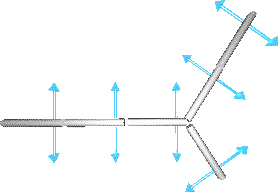 |
| X(X,RRX(X,X)) |
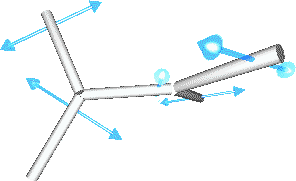 |
| XlCXlCXlCX |
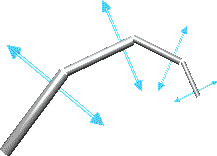 |
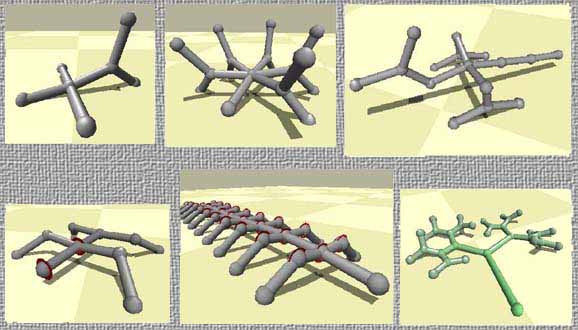
Some more samples of possible structures:
Creature brain
Neurons are placed in [], after X's. The following information can be supplied inside square brackets:
- neuron type
- properties (parameters) of the neuron
- inputs of the neuron (if it can have inputs)
The syntax is:
Neuron inputs can be taken from different signal sources: other neurons' outputs or receptors. A neuron input can also have a constant value. If a neuron is a muscle, it can control its stick's bend or rotation.
A useful tool for adding/removing neurons from an f1 genotype while preserving relative references (links) between neurons is here.
See also: the brain simulation page.
| The alternative (old, deprecated) syntax lets you describe two neurons (a muscle and 'N') in one:
[ MuscleType PropertyAndInputList ]
where MuscleType is either '@' (stick's rotation) or '|' (stick bend). This old syntax creates an 'N' neuron, as described in [...], and a muscle of MuscleType with input from that neuron. Thus the old syntax is equivalent to[ N, PropertyAndInputList ] [ MuscleType, -1:1 ] In the old genotypes, you could find names of 'N' properties denoted as symbols !=/. They are deprecated, and equivalent to:
|
Examples
Enter these genotypes into Framsticks GUI to see the corresponding neural networks.
- X[N]
- X[@]
- X[@][N]
- X[@, 1:1.0][N]
- X[1:1.0][-1:2.0]
- X[G][-1:-3.5, -1:-0.5, 0:0.1]
- X[N, fo:1, si:-4]
- X[Sin, f0:0.1, t:0.5]
Examples of the old, deprecated syntax
... X[@-1:2,1:3] ...means that a stick has one neuron 'in' it. It controls the stick's rotation (@), and the neuron has two inputs: one comes from relative position −1 in the genotype, and the other from relative position +1. The first 'signal' weight is 2, the other is 3.
X[|*:1,G:2]
is a stick with one neuron controlling its bend, having two inputs: one constantly equal to 1 and the other connected to a gyroscope (placed on the stick) weighted 2.
One stick can have many neurons – X[.....][.....][.....]
Example:
X X[|0:1] X[@-1:1.2,1:2.3][G:1]
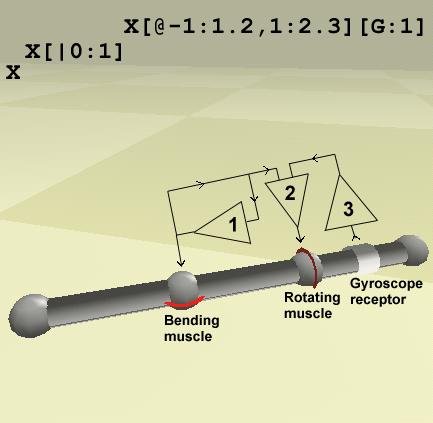
- neuron (1) affects the stick's bend and is looped recursively
- neuron (2) affects the stick's rotation, and receives signals from neurons (1) and (3)
- neuron (3) has one input: gyroscope (equilibrium sense of the last stick)